Welcome to WinAbility Software!
USBCrypt secures flash drives with strong encryption
Why settle on a plain insecure flash drive when you can make it encrypted and secure?
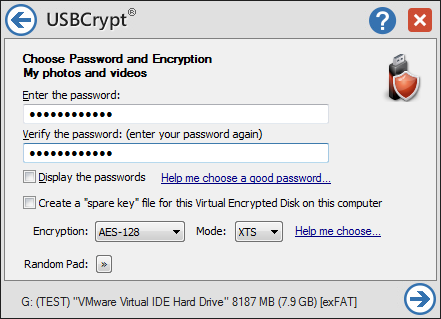
With USBCrypt® software, you can create a secure storage area on your flash or other removable or regular drive (such as USB, SATA, etc), and store your files there. If someone gets hold of such a drive, they won't be able to get your files without your password. Not the CIA, not the FBI, not even the NSA.
Read more...
Read more
- How to disable Adobe's ability to scan all of your organization's documents for generative AI.
- [SOLVED] How to disable Taskbar Thumbnail Preview in Windows 11.
- How to restrict access to Microsoft Store app with Folder Guard.
- Tired of the Your password has expired and must be changed prompts? Here is how to stop them.
- How to move Pictures and other folders to Virtual Encrypted Disk.
- How to disable Fast Startup if you use encryption software.
- How to restore Videos, Pictures, and other folders in This PC in Windows 11.
- How to create a local user account in Windows 11 or Windows 10.
- How to enable or disable test signing mode in Windows.
- Email or SMS text messaging are NOT secure for two-factor authentication.
- Estimate how much you could save on electric bill with ActiveExit software.
- How to delete partition on Windows 11 or Windows 10.
- Forget VeraCrypt password? Here is how to recover it.
- Why do my desktop icons keep moving?
- How to create a private folder in Windows 11 and 10.
- How to restrict access to Windows Settings with Folder Guard.
 Suspending all contact with fascist Russia
- How to keep desktop icons from moving by running Icon Shepherd from command line.
- How to restrict access to Task Manager with Folder Guard.
- Take ownership of your files after access denied due to NTFS permissions.
- How to reprogram or disable CAPS LOCK key.
- Encryptability vs Folder Guard: which one to choose?
- Troubleshooting software removal problems using MSI files.
- Encryptability: Compare Personal and Business Licenses.
- How to add Group Policy and Local Security Policy to Windows 11 and 10 Home edition.
- [SOLVED] File is too large for the destination file system.
- Forget your WI-FI password? Find it in Windows 11 and 10 settings.
- What is FAT32 maximum file size limit?
- How to create a secret folder in Windows 11 and 10.
- How to easily password-protect Windows Linux folders with Folder Guard.
- Force DISKPART to delete EFI system partition in Windows 11 and 10.
- How to make Windows 11 and 10 recognize a cloned hard drive again.
- How to stop Windows 11 and 10 from using thumbnail preview icons for folders.
- How to hide pictures from the Photos app in Windows 11 and 10.
- How to save Windows Spotlight photos to your computer.
- How to move the OneDrive folder to an encrypted drive.
- Windows 10 fails to upgrade? Here is how to fix it.
- How to stop Microsoft Edge from opening PDF files.
- Preventing installations of specific programs with Folder Guard.
- Folder Guard licensing explained.
- Speed up the updates of the network folders.
- Make your Windows laptop work as a Wi-Fi access point.
- How to stop automatic Windows Update in Windows 10 and 11.
- [SOLVED] Windows cannot connect to the printer. Access is denied.
- Migrating encrypted data from TrueCrypt to USBCrypt.
- “The Microsoft account service is unavailable right now. Try again later.”
- Using DiffMerge as the external tool of AB Commander to compare plain text files.
- How to repair the icon cache and/or thumbnail cache in Windows 11 and 10.
- Transferring images between your PC and an Android device: Part 2.
- Transferring images between your PC and an Android device: Part 1.
- Case study: Using SoftDetective to suppress Corel Guide sign-in prompt.
- Using junction points to change the iTunes backup folder location.
- How to tell if my Windows computer is 32- or 64-bit?
- How do I stop Windows from rearranging my desktop icons?
- Organize your photo library with the Rename tool of AB Commander.
- Windows does not offer the NTFS format option? Here is how to bring it back.
- How to encrypt Firefox profile, bookmarks, and cookies.
- Restarting Windows 11, 10, and Windows 8 in the safe mode.
- Integrating AB Commander with Universal Viewer.
- How to delete a protected EFI system partition with Windows 11,10, 8, or 7.
- Using Folder Guard to protect from the social engineering attacks.
- How to erase Windows login password if you forget it.
- How to unhide a folder hidden with Folder Guard.
- How to repair Windows desktop icons with AB Commander.
- Slow network in Windows 7 Virtual PC? Speed it up!
- How to show drive letters first in AB Commander and Windows Explorer.
- What is my IP address?
- Why can’t I copy large files over 4GB to my USB flash drive or SD card?
- Test the strength of your password with USBCrypt.
- How to set up an external text editor for AB Commander.
- How to restrict Internet Explorer from downloading programs from the Internet.
- Personal vs business license for USBCrypt.
- Use Folder Guard to restrict access to Control Panel.
- Compare MySecretFolder and Folder Guard.
- Hide folders and make files invisible with Folder Guard.
- WINEXIT vs ActiveExit: automatically log off users from Windows.
- How to protect folder with password in Windows 11 and 10.
- How to restrict access and lock external drives with Folder Guard.
- How to password-protect Dropbox folder with USBCrypt.
- How to set up Folder Guard to stop downloading from the Internet.
- Is (Wipe the content) the same as (Secure Delete)?
- How to encrypt and protect the system C: drive with USBCrypt.
- Make it easier to return your lost encrypted drive.
- USBCrypt for users of Microsoft Office.
- How to start programs elevated from a batch file.
- How to make elevated programs recognize network drives.
- How to disable or enable hibernation.
- Using names and labels to organize USBCrypt drives.
- How to password-protect a USB flash drive.
- Always have a backup of your important files.


 Stand with Ukraine