Active Exit: automatic logoff software for Active Directory and Group Policy (WINEXIT replacement)
 ActiveExit™ is an auto-logoff program that can automatically log off users from their accounts after a period of inactivity. If you are a system administrator and users of your network often forget to logoff before leaving, ActiveExit can save you quite a bit of your nerve cells. Even if the user has locked the computer, Active Exit can log the user off after the idle period you specify, without your intervention.
If you manage a large network of computers using Active Directory and Group Policy, you can use ActiveExit to edit a Group Policy Object (GPO) to manage all network computers from one central location on the server.
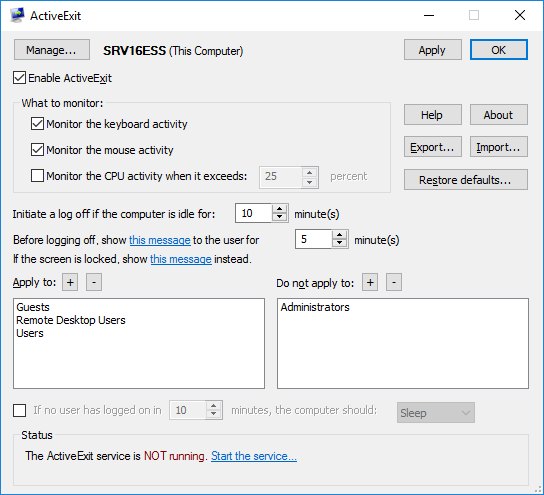
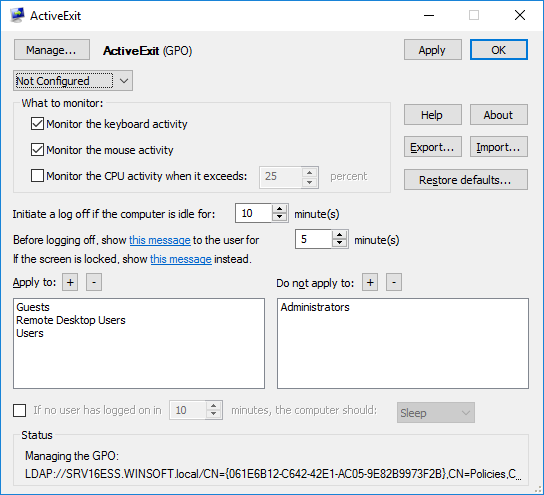
What can ActiveExit do for you?
Log off the inactive users automatically
When ActiveExit is enabled, it is monitoring the user activity: the keyboard, the mouse, and (optionally) the CPU. If no user activity has been detected during the time interval of your choosing, ActiveExit displays a message to the user (for the duration of your choosing, too). If no user activity detected after that, ActiveExit forcefully logs off that user from Windows.
Log off the inactive users even if they locked their screens
Unlike WINEXIT and other similar utilities, ActiveExit can log off the inactive users even if the users locked their screens before leaving. (The administrator will no longer have to unlock the screens manually each time it happens).
Log off the inactive users even if they set up custom screen savers
Unlike WINEXIT and other similar software utilities, ActiveExit does not replace the screensaver of the user with its own. If fact, ActiveExit does not depend on the Windows screensaver functionality at all: each user is welcome to choose any screen saver or none at all, ActiveExit will work just the same.
Log off the inactive users even if they have unsaved changes
This is a powerful feature of ActiveExit that you should consider carefully. Normally, if a user attempts to log off while there are unsaved changes to the documents, Windows prompts the user to save the changes before logging off. With ActiveExit, the automatic log off happens unconditionally, even if there are changes still unsaved by the user. The unsaved changes, if any, will be lost and the user will be logged off.
Log off the inactive users on schedule
If you would rather not logoff the users during the normal work hours, you can set up a custom schedule to specify exactly when ActiveExit should or should not logoff the inactive users.
Shut down, sleep, or hibernate the inactive computers
After the last user has logged off, if no one logs back on to the computer during the interval of your choosing, ActiveExit can shut the computer down, sleep, or hibernate it.
ActiveExit is enterprise-ready
Attention System Administrators: ActiveExit is enterprise-ready! The ActiveExit Administrator's Kit is available now.
ActiveExit supports Windows Server 2025 (and earlier versions, both x64 and 32-bit). ActiveExit fully supports Active Directory and Group Policy, as well as the automatic software installations with the MSI packages, that makes it easy to deploy and manage it even on a large network.
You can use ActiveExit configuration utility to directly edit a GPO (without the need to mess with the ADM or ADMX files) and manage a large number of the domain computers from one central server via the Group Policy.
If you have not done so yet, feel free to download a no-strings-attached-no-obligation installation file of ActiveExit and see for yourself how ActiveExit can be of use to you:
ActiveExit User's Guide • Purchase • Download
More information
ActiveExit 26.7

Buy ActiveExit license
from $49.95
Download ActiveExit Lite
More information:
ActiveExit Home Purchase ActiveExit Download ActiveExit Lite Download Admin Kit Documentation Support
 Stand with Ukraine
Our software:
Folder Guard Encryptability USBCrypt AB Commander MySecretFolder ActiveExit StartFinity IconShepherd SpaceInvestigator SoftDetective TweakUAC
Is WinAbility.com safe?