How to restrict Internet Explorer from downloading programs from the Internet
It's possible to set up Folder Guard to stop downloads of programs with any web browser, including Internet Explorer, Firefox, Chrome, Opera, Safari, and so on.
Suppose you don't want users to download programs from the Internet, yet you would rather not to block the Internet access completely and allow the users to to browse the web sites, use email, etc.
For such a goal, you could set up Folder Guard to restrict Internet Explorer from downloading the programs from the Internet. Folder Guard lets you create the file access filters. You could create a filter that would apply to any executable file or a script, but skip other files. You would assign the Read-only attribute to such a filter, and that would stop any attempt to create a new executable file (and thus prevent downloading them!), while allow the use of the existing programs.
To do that, run Folder Guard and choose View - Filters command from the menu to switch to the Filters view. The filter we need may already be there, look for the name Stop common downloads. If it's not in the list, choose the Filter - New command from the menu to start creating a new filter. Click on the [...] button next to the Apply to files box to specify which files this filter should apply to. The names of the executable files have the extension .exe, so you need to specify the mask *.exe to make the filter apply to any such file. You don't want the users to download the DLL files either, so add the mask *.dll to the list, too. In fact, add a few other masks to make the filter apply to the files commonly used to run scripts, as well (because you probably don't want the users to run arbitrary scripts!). Here is the text of the Apply to files box that you can use as a starting point for the list:
*.bat;*.cmd;*.com;*.dll;*.download;*.exe;*.hta;*.msi;*.paf;*.rar;*.scr;*.vb*;*.ws;*.wsf;
Your may need to make some modifications to this list: for example, if your users are supposed to be able to modify the BAT scripts, remove the *.bat mask from the list.
Leave the rest of the properties of the new filter empty:
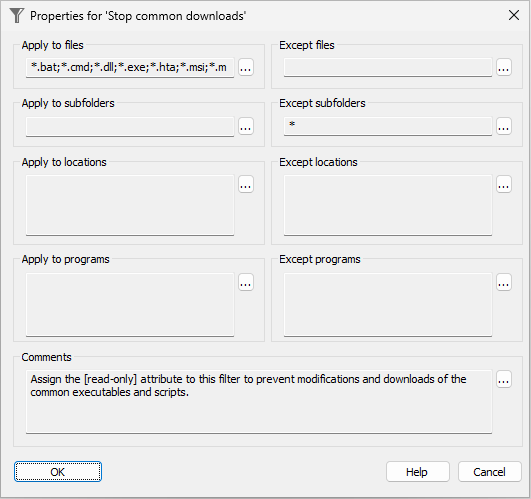
Press OK to close the properties window. If it's a new filter you've just created, you will be prompted to enter a name for the filter. Give it a meaningful name such as Stop common downloads to remind yourself later on why you've created the filter:
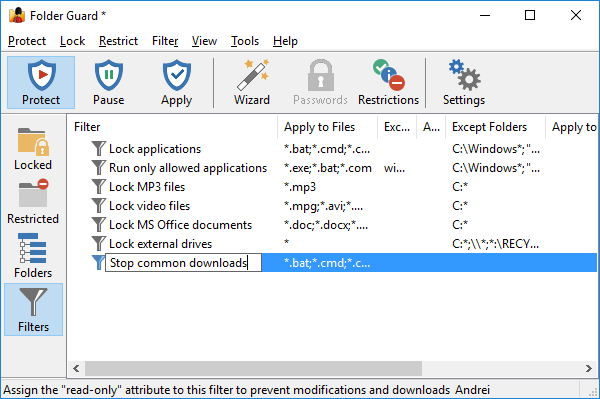
After the filter has been created, move it to the top of the list (using the Move Up command on the Filter menu) and assign the Read-only attribute to it (by, for example, clicking on the Read-only button in the toolbar):
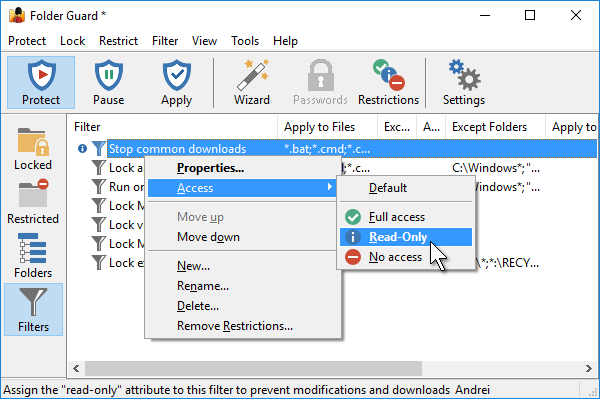
(You may have other filters in the list, you can leave them as they are: if they have no icons in front of them, they will have no effect).
A couple more things to do: check the Trusted Users list of Folder Guard and verify that the SYSTEM user is there. Also check the Trusted programs list, and make sure the following programs are listed:
C:/Windows/System32/wuauclt.exe
C:/Windows/servicing/TrustedInstaller.exe
The above entries ensure that Windows Update has an unrestricted access to all files and folders of your computer. Without them, the filter we've created would prevent Windows Update from installing the updates.
At this point Folder Guard is ready to start protecting your computer. Apply the changes (or resume the protection) and test it by trying to download a few programs from various web sites. (If you a looking for a few files to test, you are welcome to use the download page of our web site.)
If you try to download an executable file with Internet Explorer while the filter is in effect, the following error message is displayed:
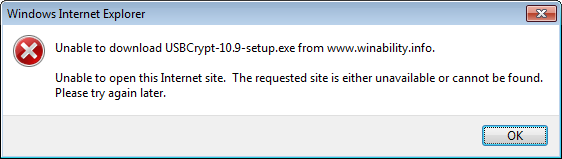
Other web browsers could give similar messages, or they could just sit there forever expecting the download to start. The end result is, the users cannot download programs anymore while they still can use the existing programs!
Attention System Administrators: Folder Guard is enterprise-ready! The Folder Guard Administrator's Kit is available now.
What if at some point you do need to download or install a new program, or remove an exiting one? Well, just pause the protection of Folder Guard, perform the task, then resume the protection back (no Windows restart required).
One side effect of the protection we've just set up is that the filter will not only prevent downloading the programs, but it will also prevent installing or copying programs from/to the CD or removable drives. It may be a good thing, or not, depending on your specific requirements. If you want the users to be able to run programs from the removable drives while the Stop downloading filter is in effect, you need to create another filter that would specifically allow full access to the executable files located on the removable drives.
Folder Guard User's Guide • Videos • Download • Purchase
If you want to link to this article, you can use this HTML code: <a href="https://www.winability.com/restrict-internet-explorer-from-downloading-programs/">How to restrict Internet Explorer from downloading programs from the Internet</a>
More information
- Encryptability vs Folder Guard: which one to choose?
- What people are saying about Folder Guard...
- How to enable or disable test signing mode in Windows
- Folder Guard videos
- A FREE 30-day license is included
- What's new in the new version
- Folder Guard licenses explained
- End User License Agreement (ELUA)
- Emergency Recovery Utility
- How to lock folders and drives with passwords
- How to hide folders and files
- How to unhide a folder hidden with Folder Guard
- How to create a secret folder in Windows 11 and 10
- How to restrict access to Windows Settings
- How to restrict access to Control Panel
- How to set up Folder Guard to stop downloading from the Internet
- Locking access to the external drives with Folder Guard
- How to make Folder Guard recognize network drives
- Preventing installations of specific programs with Folder Guard
- How to restrict access to Task Manager with Folder Guard
- How to restrict access to Microsoft Store app with Folder Guard.
- How to password-protect a USB flash drive
- Always have a backup of your important files
Folder Guard 24.11

User rating:
 4.7 / 5
Buy Folder Guard
from $29.95
Download free trial
More information:
Folder Guard Home Folder Guard Videos Purchase Folder Guard Download Folder Guard Documentation Support
 Stand with Ukraine
Our software:
Folder Guard Encryptability USBCrypt AB Commander MySecretFolder ActiveExit StartFinity IconShepherd SpaceInvestigator SoftDetective TweakUAC
Is WinAbility.com safe?