Copy All Restrictions |
|
Copy All Restrictions |
|
The Copy All Restrictions screen is displayed when you use the Copy all restrictions to another user command from the User bar menu:
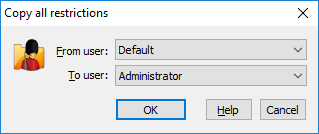
You can use this screen to quickly copy the restrictions of all folders, files, and filters between different users listed in the User List of Folder Guard. This dialog box contains the following areas:
The name of the user whose restrictions should be copied to another user account.
The name of the user account the restrictions should be copied to.
This operation makes the restrictions of all folders, files, and filters for the user specified in the To User field identical to those of the user specified in the From User field. Note that this command has no effect on the folder passwords, because such passwords are not user-specific, they apply to all users.

 Copyright © 2026, WinAbility® Software Corporation
  . All rights reserved