Go to special folder |
|
Go to special folder |
|
The Go to Special Folder screen is displayed when you use this command on the Tools menu. (This command is enabled only when the Folders view of the main window is active.)
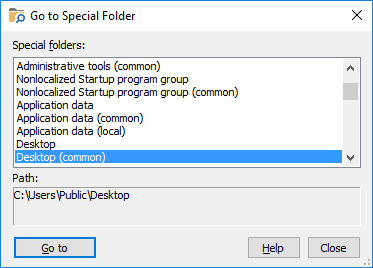
You can use this screen to quickly locate one of the special folders of Windows and select it in the folder tree window of Folder Guard. A special folder is a folder used by Windows for special purposes. For example, the Desktop folder is used to store the items displayed on the Desktop, the Start Menu folder is used by Windows to keep the shortcuts that appear on the Start Menu, and so on. This screen contains the following areas:
The list of the special folders defined for the current user account, as well as the common special folders (used for all user accounts). Note that the content of this list depends on the version of Windows that you use, as well as on the configuration of the user's accounts that you have set up.
Displays the full path of the currently selected special folder.

 Copyright © 2026, WinAbility® Software Corporation
  . All rights reserved