Report |
|
Report |
|
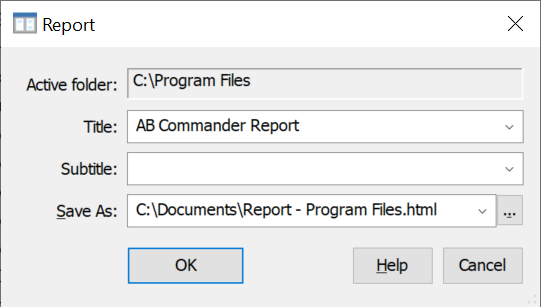
This screen is displayed when you choose the Report command from the Command menu. You can use this command to create a file in the HTML format with information about the files and folders in the active folder and its subfolders. This screen has the following areas:
The active folder which contents will be included in the report. You cannot change this folder directly on this screen, but you can change it by navigating to a different folder, before issuing the Report command.
The text to be used as the title of the report. If you leave this box empty, the default title AB Commander Report will be used. If you don't want the report to have a title, enter the space character in this box.
An optional text that, if provided, will be used as a subtitle of the report.
The path to the report file in the HTML format to be created.
After the report file has been created, you can open it with any web browser. The report should look similar to the following:
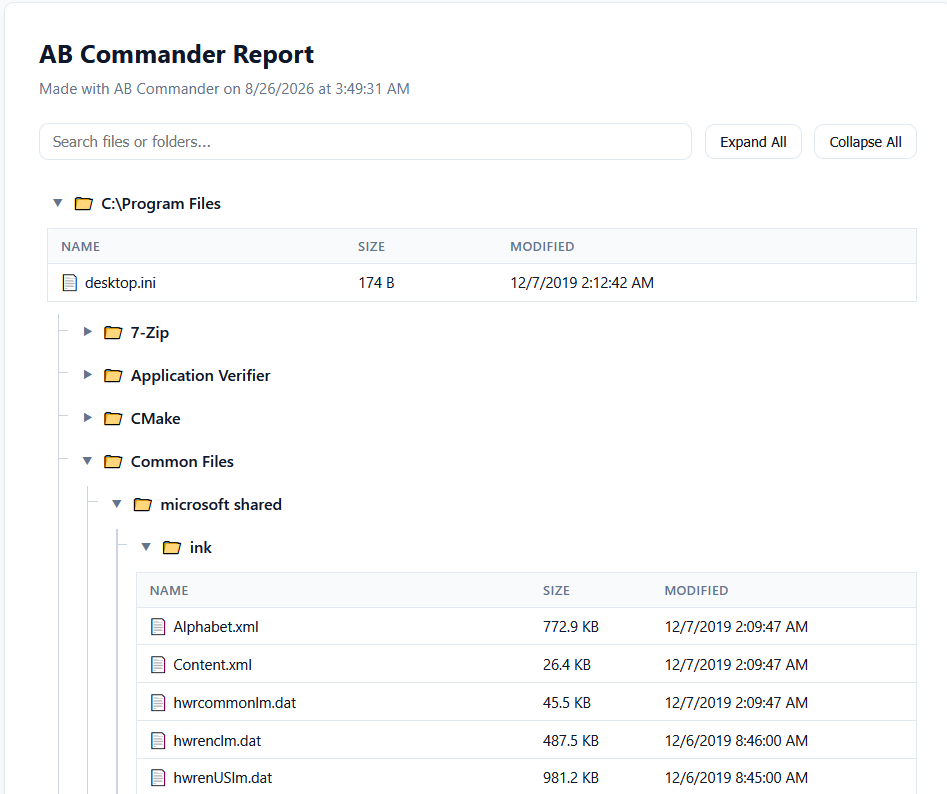
Each file in the report would have its name, size and the time of last modification. To print the report, use the Print command of the web browser.

 Copyright © 2026, WinAbility® Software Corporation
  . All rights reserved