Add/remove users |
|
Add/remove users |
|
The Add/remove users screen is displayed when you use this command on the Tools menu.
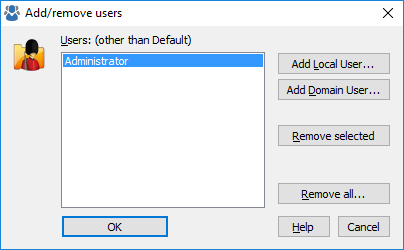
You can use this screen to manipulate the list of the user accounts that appear in the User List of Folder Guard. Then, you can restrict access to your files and folders differently for different users. Note that Folder Guard uses a special Default user that always appears in the User List and cannot be removed. This screen contains the following areas:
The list of users currently included in the User List, in addition to the Default user account.
Press this button to add a new name to the User List by choosing the name from the list of the local users of your computer.
Press this button to add a new name to the User List by choosing the name from the list of the domain users (if your computer is connected to a domain).
Press this button to remove the selected name from the User List. (It will NOT delete the user account itself!)
Press this button to remove all user names from the User List. (It will NOT delete the user accounts themselves!)

 Copyright © 2026, WinAbility® Software Corporation
  . All rights reserved