Editing text files |
|
Editing text files |
|
AB Commander comes with a built-in Quick Editor that you can use to quickly view and edit any text file, not necessarily associated with any particular application. This command is especially useful when working with simple text files (such as the files created with Windows Notepad) that contain no formatting information.
To use the Quick Editor, select the text file you want to open, and choose the Quick Edit command from the Tools menu (or press the Ctrl+Q key combination), and the file will be opened with the Quick Editor for you:
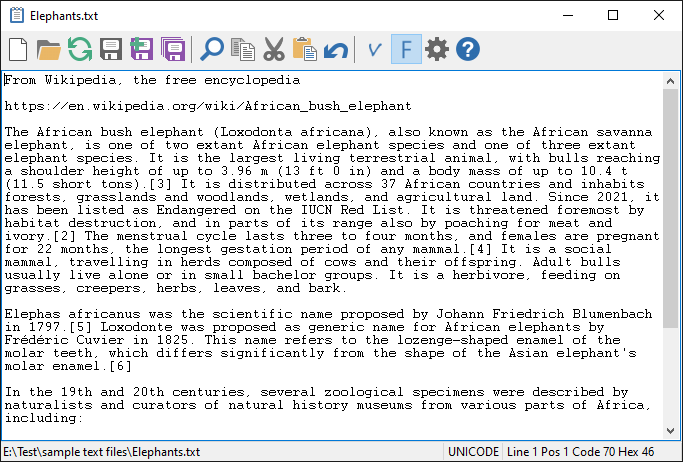
The internal Quick Editor can be used as a complete Notepad replacement within AB Commander. It can be used to edit the regular ASCII text files, as well as the Unix and Unicode files, including those encoded in the UTF-8 format. The binary files can be viewed with the internal Quick Editor, too, although editing them would be disabled.
In addition to the built-in text editor, you can also set up an external text editing application, that you can use to edit the text files, too. When you install AB Commander, the built-in text editor is set up as the preferred quick editor, accessible via the Ctrl+Q key combination, and the external editor is set up as the alternative editor, accessible by pressing the Ctrl+Shift+Q keys. You can change this assignment using the Tools page of the Options window of AB Commander. You can also change the external editor to another application, if desired.
CAUTION: Quick Edit is a powerful command that must be used with care. If you use Quick Editor to modify binary files, or files that contain not only text but also formatting information, you can corrupt the files. For example, if you want to change something in a Microsoft Word document (normally, a file name that ends with the .doc extension), open it with Word, not with Quick Editor, to preserve the formatting of the document. (If you simply want to view the raw contents of a Word document, then Quick Editor can be used.) In general, don't use the Quick Editor to modify non-text files, unless you are sure of what you are doing. When in doubt, make a backup copy of the file before modifying it!

 Copyright © 2026, WinAbility® Software Corporation
  . All rights reserved