Status bar indicators |
|
Status bar indicators |
|
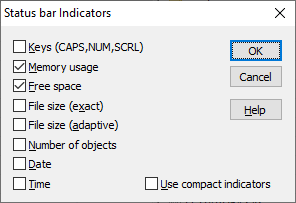
This window is displayed when you choose the Status bar - Indicators command from the View menu. You can use this window to change the set of indicators displayed on the Status bar. This window contains the following areas:
These indicators show the current state of the CAPS, NUM, and SCRL keys.
This indicator shows the percentage of physical RAM (Random Access Memory) used by all currently running processes, including AB Commander and the operating system itself. If it shows 100% (or close to 100%) while you perform your regular tasks, you may want to add more RAM to your computer.
This indicator shows the amount of free space on the storage partition of the active folder. If the folder currently shown in the active panel is not a real folder, this indicator does not report anything.
This indicator shows the exact total size of the currently selected files in bytes.
This indicator shows the approximate total size of the currently selected files in units dependent on the resultant value (bytes, KB, MB, etc.)
This indicator shows the total number of objects currently displayed in the active panel). If more than one object is selected in the panel, then this indicator shows the number of the selected objects.
This indicator shows the current date, using the system-wide format, as defined by the Control Panel.
This indicator shows the current time, using the system-wide format, as defined by the Control Panel.
If this option is selected, then the values of the indicators are displayed in such a way as to take as little space as possible. If this option is cleared, some additional information is displayed with the values of the indicators.

 Copyright © 2024, WinAbility® Software Corporation
  . All rights reserved