Options - Hot Key page |
|
Options - Hot Key page |
|
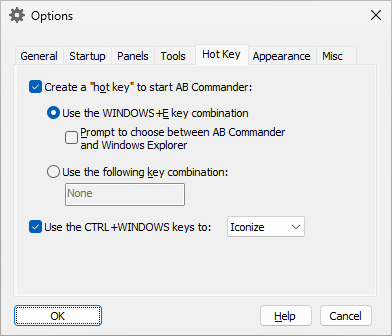
This page is displayed when you select the Hot Key tab on the Options window. You can use this page to set up a "hot key" to start or activate AB Commander. This page contains the following areas:
If checked, this option causes AB Commander to set up a hot key.
If selected, this option lets you instruct Windows to run AB Commander instead of Windows Explorer when you press the WINDOWS+E key combination.
If selected, this option lets choose between AB Commander and Windows Explorer, when you press the WINDOWS+E key combination.
If selected, this option lets you choose a different key combination to run AB Commander. The WINDOWS+E key combination would still be available to run Windows Explorer.
If selected, this option enables you to use the CTRL+WINDOWS key combination to quickly exit, minimize, or iconize AB Commander.

 Copyright © 2024, WinAbility® Software Corporation
  . All rights reserved