Delete |
|
Delete |
|
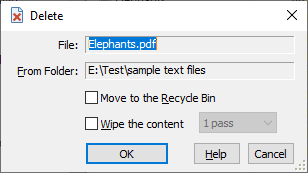
This window is displayed when you choose the Delete command from the Command menu. You can use this window to delete one or more files and/or folders from the active folder. This window contains the following areas:
This read-only area displays information about the objects to be deleted.
This read-only area displays the full path to the active folder that contains the source files and folders to be deleted.
If this option is checked, then the file is moved into Windows Recycle Bin (which you can use to recover the deleted files in case you need them later on, unless the Recycle Bin has been emptied, of course). If this option is not selected, then the file is actually deleted, bypassing the Recycle Bin. Please be very careful when clearing this option, because if you delete a file without moving it to the Recycle Bin, it may be impossible to recover it!
Keep in mind also, that Windows maintains the Recycle Bin on the hard drives only. If you delete a file from a removable or a mapped network drive, it will NOT be moved to the Recycle Bin even if you select this option!
This option is available (and has an effect) only if the Move to the Recycle Bin option is not selected. If the Wipe the content option is selected, then in addition to deleting the selected files and/or folders, AB Commander will erase their contents, by writing fixed bit patterns into each file to be deleted, before actually deleting them. The bit patterns written to the files depend on the number of passes selected next to this option:
You may want to use the Wipe the content option to make it much more difficult to extract the contents of the files after they have been deleted. If you don't select this option, there is a possibility to reconstruct the original contents (or their parts) by using the undelete software utilities. Keep in mind, however, that as with most things, wiping the contents of the files is not an absolute guarantee of their complete destruction: it all depends on the specific implementation details of all components involved. For example, if you have enabled the NTFS compression for a file, then wiping it out may not achieve the desired effect, because when recording the bit patterns to the file, Windows may create a new compressed file from scratch rather than reuse the existing file. Or, most modern SSD drives may use the wear-leveling techniques that could prevent overwriting the existing data with the bit patterns. Remember that the only way to be absolutely sure that the files cannot be recovered, is to physically destroy the drive!

 Copyright © 2026, WinAbility® Software Corporation
  . All rights reserved